Something To Do
A decade of places, memories, reviews, trip planning, and privacy-first local AI.
Timeline
2022 — Present
Role
Product, Full Stack & iOS Development
Context
Personal Project
Platforms
Web (PWA) & Native iOS
Links
Overview
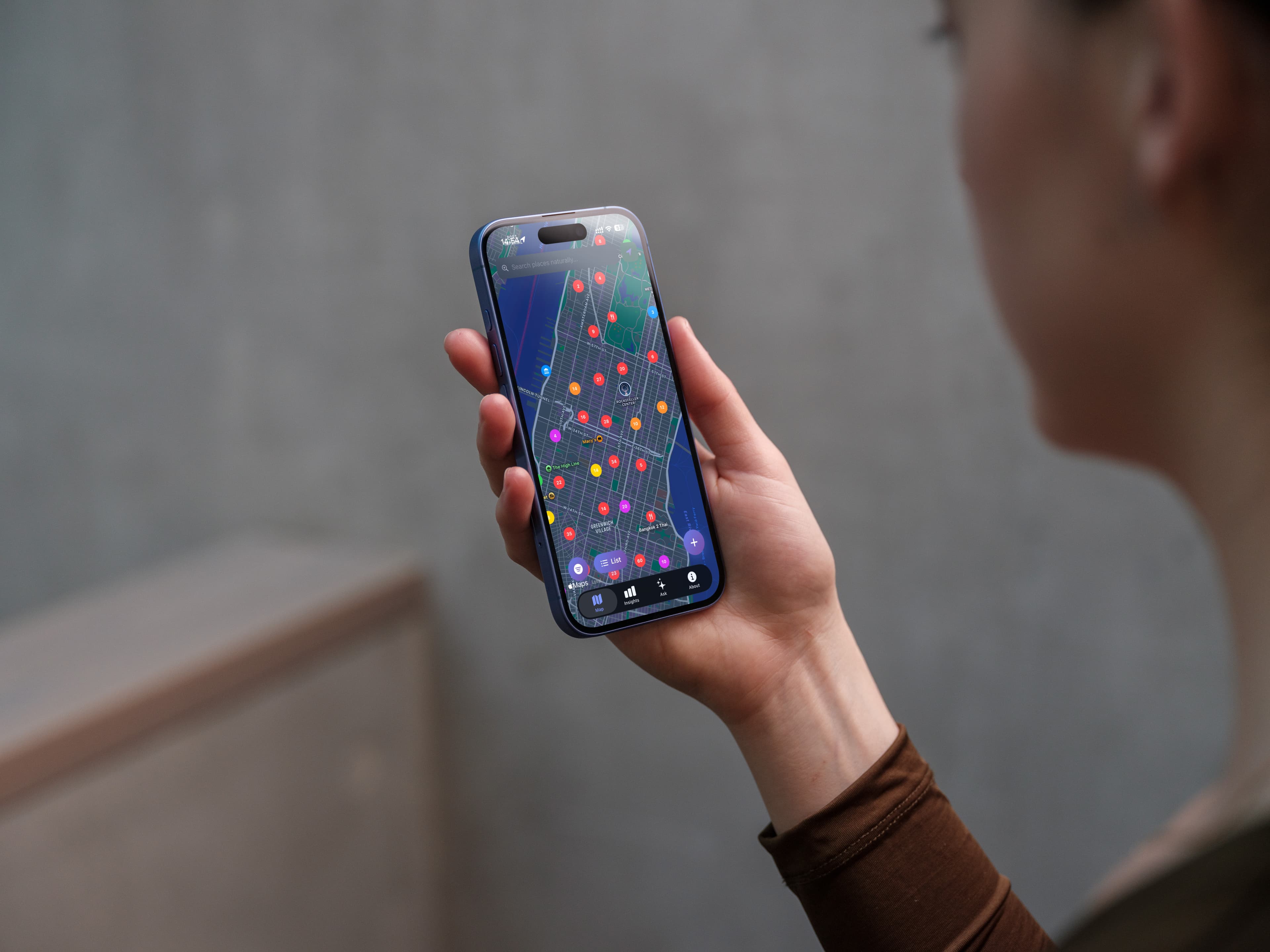
Something To Do started in 2022 as a personal journal: a way to save places I wanted to visit, capture candid reviews once I went, and organize activities without relying on commercial rating algorithms or big-tech data tracking.
Beginning in 2025, I evolved this project into a high-performance native iOS application written in Swift 6, UIKit, and SwiftUI. The mobile app operates on an uncompromising philosophy: 100% offline-first with zero servers required. Everything from vector embeddings and RAG-based AI search to local maps, itinerary planning, and iCloud sync happens directly on your device.
Over dozens of iterations across 2025 and 2026, Something To Do has matured from a simple bookmarking tool into an intelligent exploration companion. It features on-device foundation models, multi-stop walking route comparison, Lock Screen Live Activities with Dynamic Island integration, vision-based screenshot importing, interactive 3D globe visualizations, and full trip itinerary scheduling.
Key Accomplishments
- Zero-Server Offline Architecture: Built a native iOS app in Swift 6, UIKit, and SwiftUI where all place data, vector indices, and offline maps run entirely on-device with seamless background iCloud backups.
- Privacy-First On-Device AI: Integrated native Apple Foundation LLMs alongside local
llama.cppruntimes (Gemma 4, Llama, and Mistral) with an on-device RAG semantic search pipeline and token-sanitizing prompt builder. - Full Itinerary & Route Engine: Created a day-by-day trip planner with interactive timelines, overnight schedule normalization, automatic chronological sorting, and Map Compare Mode for comparing multi-stop walking routes with exact MapKit polylines.
- Vision OCR & Multi-Channel Import: Implemented an on-device text extractor utilizing Apple Vision to parse places from screenshots and camera photos, alongside import parsers for Apple Maps Guides, Google Maps collections, and web URLs.
- Live Activities & Dynamic Island: Designed real-time outing tracking (
OutingLiveActivityWidget) on the Lock Screen and Dynamic Island with arrival detection, paired with interactive Home Screen widgets for one-tap place visits. - 3D Globe & Media Studio: Engineered an interactive 3D globe visualization in DataViz, an NLP word insights analyzer for notes, and automated 4K / 9:16 portrait video generation for an user Journey Recap.
- Long-Term Maintenance: Actively developed and maintained across both web and native iOS ecosystems from 2022 to 2026.
Technical Challenges & Solutions
Native iOS Engineering & Swift 6 Concurrency
Transitioning from web development to Swift 6 required me mastering strict concurrency models, actors, and SwiftUI & UIKit lifecycle craziness. Coordinating asynchronous services without freezing the UI led to building a dedicated StartupCoordinator that handles startup dependencies cleanly and eliminates launch hangs. I also had to learn the hard way because before hand maps, and ui icons would freeze and crash the app if the user had 100+ places... I had at the time 1600+ so it was unsuable.
On-Device RAG & Foundation Model Lifecycle
Running local LLMs without thermal throttling or out-of-memory crashes required building a fallback embedding pipeline (FallbackDistilbertModel), strict token sanitization in PromptBuilder to prevent prompt injection, dynamic model family detection across Gemma, Llama, and Qwen, and an active session auto-archiver when memory limits are reached.
Deep System Notification & Routing Architecture
Early versions suffered from hangs when launching from background notifications (This took me way too long to solve, I was about to give up on it). This was solved by refactoring NotificationManager with dependency injection of the app's active state, structured intent parsing, deduplication, and deep-link routing with comprehensive unit tests.
Web App State & PWA Longevity
On the web side, maintaining state across map views and client-side page transitions while supporting PWA offline caching required custom SVG marker projection logic and careful service worker lifecycle management across major Next.js upgrades.
Core Features
Trip & Itinerary Engine
Day-by-day scheduling with timeline cards, leg detail sheets, cross-day drag-and-drop moving, overnight duration support, trip archiving, and automated visit history logging.
Map Compare Walking Routes
Multi-stop walking route comparison tool on the map (up to 4 stops) with polyline visualizations, exact MapKit distance calculations, and direct Apple Maps / Google Maps navigation launching.
Apple Foundation & Local LLMs
Dual-engine intelligence supporting native Apple Foundation LLMs and local llama.cpp runtimes (Gemma 4, Llama, Qwen) for privacy-first RAG chat with your saved places.
Live Activities & Dynamic Island
Outing Live Activity tracking active outings with arrival detection on the Lock Screen and Dynamic Island, alongside interactive home screen widgets for instant visit logging.
Vision OCR & Guide Importing
Extract place information directly from photos and screenshots using Apple Vision OCR, plus one-tap importing of Apple Maps Guides, Google Maps links, and web pages.
3D Globe & Video Recap
Interactive 3D globe visualization for exploring geographic distributions, NLP word frequency analysis across notes, and 4K portrait (9:16) video generation for social sharing.
Release Milestones
Unreleased
Upcoming- •iOS Outing Live Activity supporting live status and place tracking on the Lock Screen and Dynamic Island.
- •Apple Intelligence Integration for on-device natural language search and place information extraction.
- •Image Place Import to extract place information from screenshots and photos using Vision and on-device OCR.
- •Interactive widget actions for marking places as visited directly from home screen widgets.
- •Localized App Shortcuts strings.
v1.4.0
Latest Release- •User-defined subcategories with custom SF Symbol icon selection and management.
- •Native Apple Foundation LLM support for on-device inference using Apple foundation models.
- •Map & navigation integration supporting opening locations in Apple Maps or Google Maps with turn-by-turn routes.
- •PlaceMapLinks model supporting Google Maps Place IDs, CID numbers, and coordinates with note link auto-detection.
- •Background notifications for Journey Recap export completion with photo library save tracking.
- •Expanded App Intents for Siri and Shortcuts, and deeper Spotlight search indexing.
v1.3.0 – v1.3.4
Itineraries & Routes- •Trip archiving and default trip designation for quick access and automated place scheduling.
- •Automatic chronological sorting for itinerary entries within each day when entry start times are set.
- •Automatic visit history logging when marking itinerary stops as completed.
- •In-place itinerary entry editing and cross-day moving via EditEntrySheet.
- •Map Compare Mode: multi-stop walking route comparison tool on the map (up to 4 stops) with polyline visualization and MapKit distance calculation.
v1.2.0 – v1.2.7
AI & DataViz Studio- •Itinerary Planning engine with TripPlan model, day-by-day scheduling, and timeline views.
- •Map Link Importing: import Apple Maps Guides and Google Maps places/collections via shared URLs.
- •Word Insights in DataViz: dedicated text analyzer surfacing recurring topics across place notes.
- •StartupCoordinator to manage startup sequence, eliminate launch hangs, and handle structured notification intent routing.
v1.1.0 – v1.1.2
Social & Concurrency- •Swift 6 strict concurrency compliance and optimized task priorities.
- •"Recommended By" tracking with autocomplete and filtering, plus companion history tracking.
- •Website importing functionality to discover and save places from URLs.
- •Enhanced local LLM ask pipeline supporting Gemma, Llama, and Mistral architectures.
v1.0.0 – v1.0.2
iOS Launch- •Initial native iOS release in Swift and SwiftUI with 100% offline capability.
- •Siri voice command capabilities and App Shortcuts discovery.
- •Widget extension entitlements with App Group support for Home Screen widgets.
- •Share Sheet extension configuration for saving locations directly from external apps.
Web Era
Origins- •Original Next.js web application and Progressive Web App (PWA) installation.
- •Custom SVG map marker system for interactive scrollytelling and geographical journaling.
- •Interactive D3.js and ThreeJS data visualizations of personal travel records.
- •Fully self-contained review and note-taking system without big-tech data tracking.
Future Roadmap
Expanding upon the introduced localized App Shortcuts strings (AppShortcuts.xcstrings) to provide complete Spanish and French localization across all mobile views.
Expanding the Vision and OCR pipeline to cross-reference photo EXIF coordinate data with local vector embeddings, automatically grouping photo memories with saved places.
Extending the Map Compare Mode beyond walking routes to include multimodal transit segments and day-by-day travel time estimates.
Built With
.jpeg&w=3840&q=75)