Diff Study
Understand the story behind every commit, branch, and pull request.
Year
2026 — Present
Role
Design & Systems Architecture
Context
Open Source Developer Tool & Hosted Version
Distribution
Standalone Bun & Go Binaries, npm, Homebrew
Links
Overview
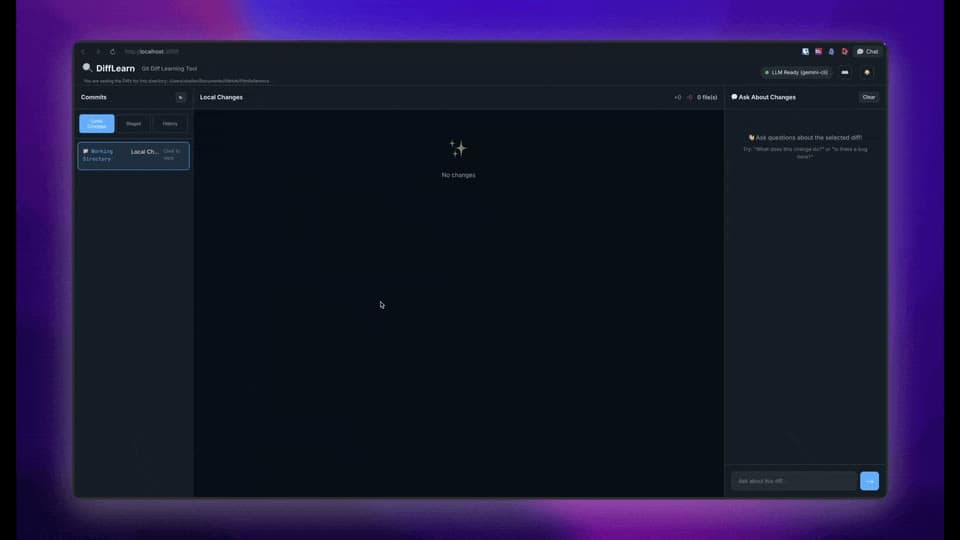
Diff Study (originally named DiffLearn) is an interactive developer tool and Model Context Protocol (MCP) server designed to demystify complex git histories. It pairs keyboard-driven terminal and browser diff viewers with contextual LLM explanations, allowing engineers to interrogate any commit, diff hunk, or branch comparison directly.
The primary motivation was streamlining new-contributor onboarding. When stepping into an unfamiliar codebase, reading raw diffs can be intimidating, and time consuming. Diff Study enables developers to point the tool at any repository, highlight unfamiliar changes, and ask natural-language questions to uncover the design intent, architectural rationale, and edge cases behind every line of code.
Diff Study avoids the friction of token subscriptions by connecting to the subscriptions you already pay for: Gemini CLI, Claude Code, and Codex, with zero per-query API fees. For 100% offline and private usage, it supports keyless integration with Ollama and LM Studio, as well as native direct cloud API access (OpenAI, Anthropic, Google Generative AI).
"This change replaces the legacy stdio MCP transport with a security-isolated SSE and Streamable HTTP endpoint, preventing symlink escapes beyond the repository root boundary."
Key Accomplishments
- Go Implementation: Built a native Go port (
go-source/) providing CLI, Web UI, API, and MCP servers with near-instant startup, negligible CPU overhead, and embedded static assets viaembed.FS. - Model Context Protocol (MCP): Implemented streamable HTTP and Server-Sent Events (SSE) transports (
/mcp,/sse,/messages) on@modelcontextprotocol/sdkv1.30.0 alongside standard stdio. - Multi-Repository Workspace Support & Security Isolation: Added the
--repositoriesCLI flag and Web UI header switcher, enforcing strict directory boundary containment, symlink traversal prevention, and Origin validation. - Zero-Cost Subscription Provider Orchestration: Developed transparent adapter layers for Gemini CLI, Claude Code CLI, and Cursor CLI, avoiding third-party LLM API metering fees by capitalizing of Agent Context Protocol (ACP) support, and usage of exisiting user subscriptions.
- Local LLM Privacy with Dynamic Model Discovery: Engineered keyless OpenAI-compatible connectors for Ollama and LM Studio, featuring dynamic model discovery endpoints (
/api/tagsand/models) for 100% offline usage. - Arbitrary Git Branch & Commit Comparison: Designed fast pairwise diff comparisons for branches (
diffstudy branch main feature) and commits (sha1..sha2) across both TUI and browser GUI. - React & Ink Terminal UI: Created a full ANSI terminal interface with red/green syntax highlighting, virtualized scrolling for massive diffs, and in-app keyboard navigation.
Core Features
Interactive Terminal Interface
Built with React and Ink, delivering 24-bit ANSI syntax highlighting, keyboard navigation (j/k), and virtualized windowing for large diffs.
Click-to-Ask & Instant Reviews
Select any code change to ask questions about it, or trigger one-click Explain, Review, and Summary with full multi-turn conversational history.
Native Go Engine
Native Go implementation with embedded Web UI assets via embed.FS, providing zero-dependency single binary execution, cross-platform compatibility, and low memory footprint.
Streamable HTTP & SSE MCP Server
Full MCP integration with Claude Code, Cursor, and custom clients over stdio, HTTP, and Server-Sent Events, exposing commit history, diff review, and explanation tools.
Subscription-Based CLI Providers
Use active Claude Code CLI, Gemini CLI, and Cursor CLI subscriptions without paying per-token API fees, with fallback to cloud API keys when needed.
Local LLM Integration
Keyless local inference with Ollama and LM Studio via OpenAI-compatible endpoints with dynamic model picker wizards for complete data privacy.
Multi-Repository Workspaces
Serve and switch between multiple local Git repositories using --repositories with path containment and symlink security.
Branch & Commit Comparison
Compare arbitrary branches (diffstudy branch b1 b2) and commit ranges (sha1..sha2) directly in the CLI or browser dashboard.
Technical Capabilities & Specifications
| Capability | Implementation & Architecture |
|---|---|
| Terminal Interface Engine | React & Ink TUI (24-bit ANSI colors, virtual scrolling & diff windowing) |
| Native Standalone Engine | Go (go-source/) with embedded Web UI assets via embed.FS (single-executable distribution) |
| Web UI & Dashboard | Responsive interface with Dark & Light themes, dynamic port assignment, and keyboard shortcuts |
| Model Context Protocol (MCP) | Dual transport: Stdio + Streamable HTTP & SSE (/mcp, /sse, /messages) on SDK v1.30.0 |
| MCP Tools Provided | get_commit_history, explain_diff, review_diff, ask_about_diff (Markdown, JSON, Raw) |
| Zero-Cost Subscription Providers | Claude Code CLI, Gemini CLI, Cursor CLI (using existing active developer subscriptions) |
| Local LLM Support | Ollama (/api/tags) & LM Studio (/models) with dynamic model discovery & keyless authentication |
| Direct Cloud Providers | OpenAI (GPT-4o), Anthropic (Claude 3.5 Sonnet), Google Generative AI |
| Git Inspection Modes | Working Tree, Staged Changes, Commit Comparison (sha1..sha2), Branch Comparison |
| Multi-Repo Workspaces | --repositories CLI flag, ~/.diffstudy configuration, and in-UI repository switcher |
| Workspace Security Isolation | Repository boundary containment, symlink traversal prevention, and origin validation |
| Binary Packaging | Bun compiled binaries (macOS ARM/x64, Linux, Windows), Native Go binary, and install.sh script |
| Configuration & Wizard | ~/.diffstudy with interactive wizard (diffstudy config) & environment overrides |
| Automated Test Coverage | 105+ unit and integration tests (diff parser, git extractor, MCP transports, security boundaries) |
Release Milestones
Unreleased
Workspace Isolation & Modern MCP- •Multi-Repository Workspace Support: introduced --repositories CLI flag and config schema to serve and switch between multiple local Git repositories seamlessly in the Web UI and MCP server without restarting.
- •Model Context Protocol (MCP) Streamlined HTTP & SSE Transport: added modern MCP transport layer (/mcp, /sse, /messages) supporting stateless discovery (MCP standard - 2026-07-28) and legacy initialization (MCP standard - 2025-11-25).
- •Repository Security Isolation: added boundary enforcement, symlink traversal prevention, and origin header validation for the local API and MCP servers.
- •Repository Selector in Web UI: interactive repository switcher for fast multi-project navigation.
v0.4.0
Standalone Go Engine- •Standalone native Go implementation (go-source/): complete Go port of DiffStudy featuring CLI, built-in Web UI, API, and MCP servers with significantly lower memory and CPU overhead.
- •Embedded Web Assets in Go: embedded Web UI static assets directly into the Go binary using embed.FS for zero-dependency standalone execution.
- •Git Branch Management in Go: added branch listing, checkout switching, upstream tracking, and automated dirty working-tree stashing.
- •Go vs. TypeScript Performance Comparison: documented benchmarks measuring CPU execution time, memory usage, and disk I/O.
v0.3.0
Branch Diffs & MCP Tools- •Interactive Branch Comparison: compare arbitrary git branches via CLI (diffstudy branch <branch1> <branch2>) and within the unified dashboard.
- •MCP Server Modularization & New Tools: modularized MCP server using a factory pattern and added tools: get_commit_history, explain_diff, review_diff, and ask_about_diff with Markdown, JSON, and raw terminal formats.
- •Enhanced CLI Provider Authentication: added auth status diagnostics, setup hints, and Cursor agent CLI auto-detection.
- •Code Quality & Linting: introduced ESLint 9 configuration with TypeScript and React hooks support, along with lint and lint:fix scripts.
- •Expanded Test Suite: added test coverage for binary diffs, git file renames, multi-hunk diffs, configuration file handling, and non-interactive CLI commands.
- •Multi-turn AI Chat: improved AI chat responses to render complete multi-turn conversation history with refined keyboard navigation.
v0.2.0
Local LLMs (Ollama & LM Studio)- •Local LLM Support: direct integration with local LLM providers (Ollama & LM Studio) using OpenAI-compatible endpoints with custom baseUrl and keyless authentication (noApiKey).
- •Local Model Selection Wizard: interactive model selection screen with dynamic model discovery (/api/tags for Ollama and /models for LM Studio).
- •Update Checking System: automatic update checks against GitHub Releases with semver comparison, on-demand /update slash command, and status bar indicators.
- •Installation Source Detection: tailored update instructions based on whether DiffStudy was installed from compiled binaries or git source checkout.
- •Updated status terminology across CLI and Web UI from "AI Ready" to "LLM Ready" for clarity.
v0.1.0
Core Launch & Terminal TUI- •Interactive Terminal UI (TUI) built with React and Ink, providing red/green syntax-highlighted diffs, keyboard navigation, and windowing for large changes.
- •Unified Dashboard: single-screen view displaying uncommitted working tree changes, staged changes, and commit history.
- •Local Web UI: responsive browser interface with dark/light themes, theme toggle, dynamic port selection, and working directory visibility.
- •Commit Comparison Mode: select and inspect diffs between arbitrary commits (sha1..sha2) in both CLI and Web UI.
- •AI-Powered Code Analysis: interactive Click-to-Ask functionality, plus one-click Explain, Review, and Summary actions.
- •Subscription-Based CLI Providers: support for Gemini CLI, Claude Code CLI, and Codex without requiring paid API keys.
- •Direct Cloud LLM Providers: support for OpenAI, Anthropic, and Google Generative AI API keys.
- •Interactive Configuration Wizard: diffstudy config command with secure credential storage in ~/.diffstudy.
- •Cross-Platform Standalone Binaries: Bun-compiled standalone executables for macOS (ARM64/x64), Linux (ARM64/x64), and Windows (x64).
- •One-Line Installer: install.sh script for automatic OS and architecture detection and binary installation.
- •Comprehensive Test Suite: 105 automated unit and integration tests covering diff parser, formatter, git extractor, prompts, CLI commands, and REST API.
Built With