CYBERDECK
The Uconsole is the perfect ready made cyberdeck out there!
UConsole: The Perfect Cyberdeck
The Uconsole is the perfect ready-made cyberdeck out there!
 IMG_6013.jpeg
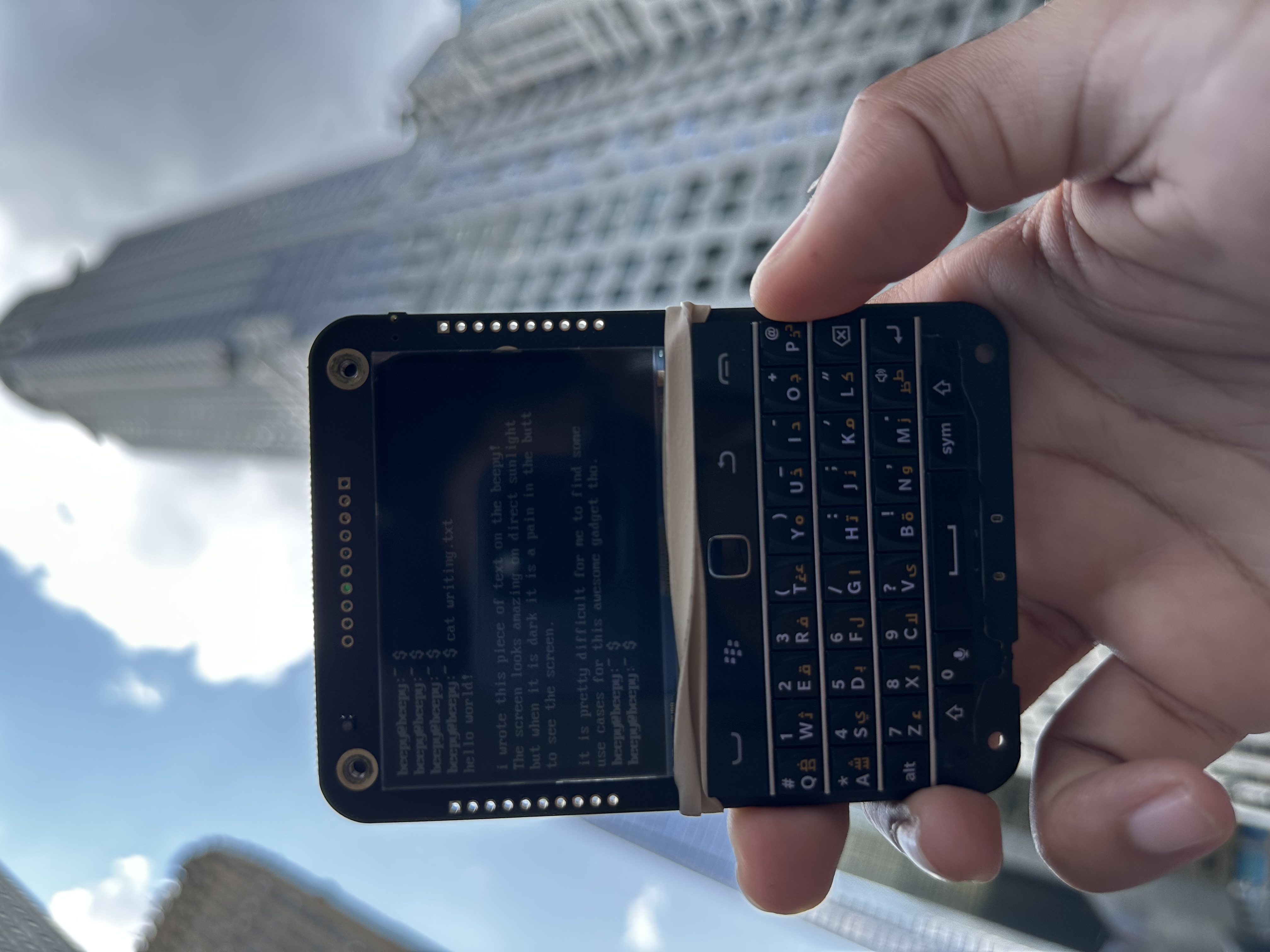
Before I bought the UConsole, I tried the Beepberry, which is now known as Beepy (https://www.jeffgeerling.com/blog/2023/messing-beepy-formerly-known-beepberry). I quickly sold it after realizing it was too underpowered for what I wanted to use it for.
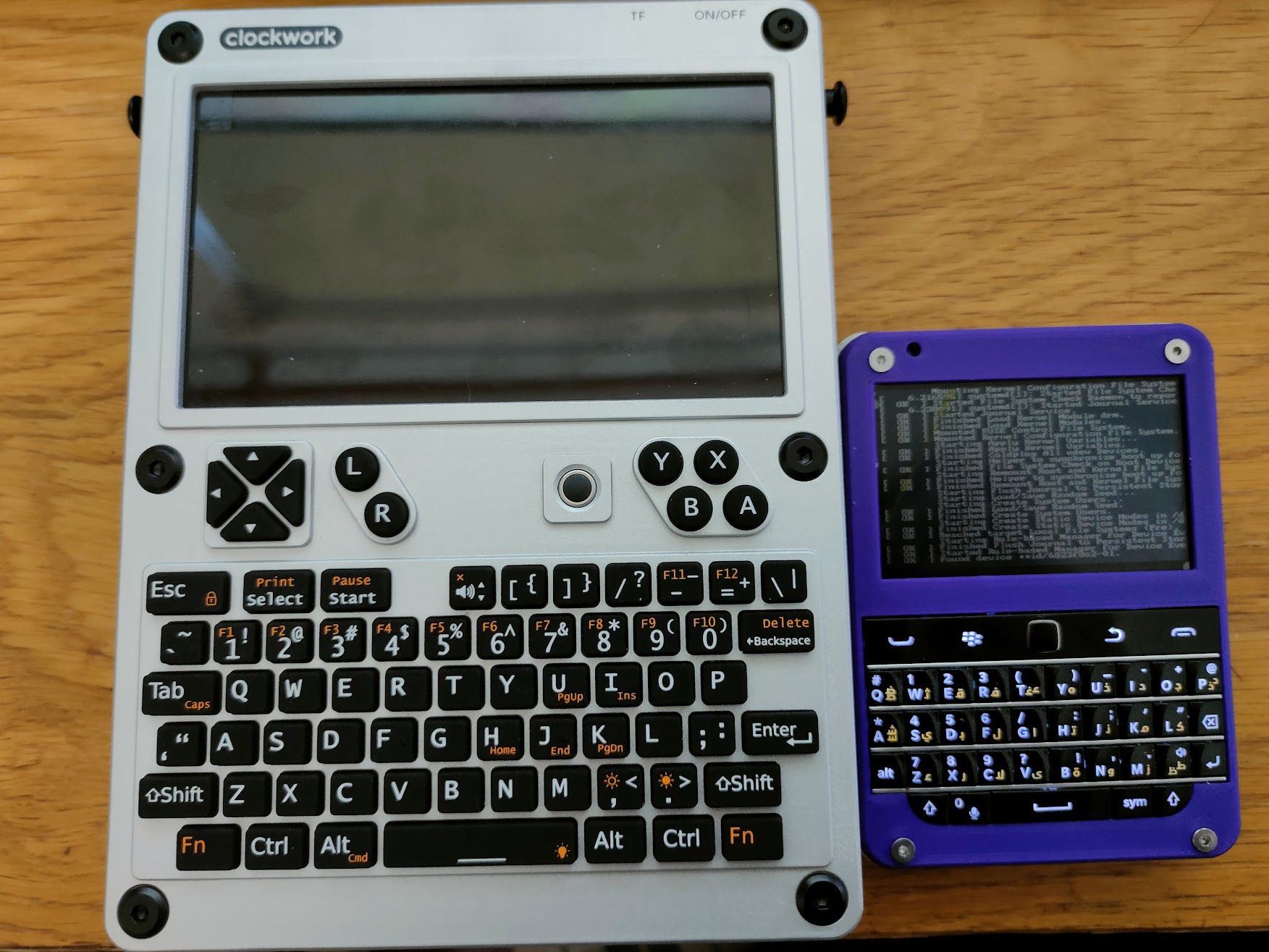 This photo was taken from The Clockworkpi Discord, and it is not mine, and I do not know who posted this back in 2023.
This photo was taken from The Clockworkpi Discord, and it is not mine, and I do not know who posted this back in 2023.
While I loved Beepy’s impressive size, the UConsole functionality and opportunities are just awesome. The UConsole offers expansion modules, a user-friendly GUI, SDR or Radio software, and full access to the extensive software library compatible with more powerful Raspberry Pi. Technically possible on the Beepy, however, the processor and RAM limitations were really annoying.
I’ve been using my UConsole since January 2024, and I’ve used it almost every day. It’s been a great addition to my everyday carry (EDC). I use and carry it almost every day without any issues and love it.
How I use my UConsole?
I use my UConsole as a portable, full-fledged computer for programming and coding on the go. It’s also a mobile SDR computer, APRS receiver, and I’ve even used it to listen to NOAA satellites, which was incredibly cool. I can go to a park without planning anything in advance and just wait for a NOAA satellite to pass over me. This freedom is what I love about the UConsole. I carry everything I need for almost any of my interests in its case, which allows me to use the UConsole more frequently and spontaneously than any other device, except maybe my smartphone or my camera. I use these two more spontaneously than my UConsole, but the fact that this device fits so seamlessly is amazing!
Setup
With the uConsole it is a must to use and run Rex bookworm Debian Image, after which I would run the following script with my bells and whistles.
Script to look at my battery life:
cat /sys/class/power_supply/axp20x-battery/constant_charge_current_max
Github login --- for Obsidian Git to work I need to first login to a git provider in my case github which is done with the command below
gh auth login
Software I use on my uConsole
-
Github Desktop
-
Filezilla
-
ProtonVPN
-
Pi-Apps
-
Pi-Kiss
-
Webcord
-
Signal
-
Obsidian
-
Curl
-
gpredict
-
GQRX
-
Btop and Htop
-
Ollama
-
Git
-
Tailscale
-
VSCode or VSCodium
-
Wine x86 & x64
-
APRS software, Yet another APRS client.
-
SDR ++
-
Satdump
-
Flatpak
Bash script
curl -fsSL https://raw.githubusercontent.com/lertsoft/AutomationScripts/refs/heads/main/uConsole.sh | sh
- Bash script to automate this process
#!/usr/bin/env bash
# Automated setup script for uConsole.
# This script is designed to replicate the uConsole setup based on the original uConsole.sh.
# All package lists are embedded within this script for easy copy-paste deployment.

set -e

# Check if running as root
if [ "$(id -u)" = "0" ]; then
   echo "This script should not be run as root. Please run as a regular user." 1>&2
   exit 100
fi

# Store the script's directory for relative paths
SCRIPT_DIR="$( cd "$( dirname "${BASH_SOURCE[0]}" )" &> /dev/null && pwd )"
cd "$SCRIPT_DIR"

echo "Starting automated uConsole setup..."

# --- 1. Update APT packages ---
echo "Updating APT package list..."
sudo apt update

echo "Installing APT packages..."
# Filter out empty lines and comments, then install packages
APT_PACKAGES=$(cat << 'EOF' | grep -vE '^\s*#|^\s*$' | tr '\n' ' '
# Quality of life tools for terminal and UI
neofetch
htop
btop++
wget

# Installing sensors in XFCE to monitor temperature and battery life
xfce4-sensors-plugin

# Installing snaps
snapd

# Installing flathub - flatpak
flatpak

# Software Dev tooling
git
curl
python3
spyder

# Installing node.js 20 on a raspberry pi (apt part)
nodejs

# SDR++ dependencies
build-essential
cmake
libfftw3-dev
libglfw3-dev
libglew-dev
libvolk2-dev
libzstd-dev
libsoapysdr-dev
libairspyhf-dev
libairspy-dev
libiio-dev
libad9361-dev
librtaudio-dev
libhackrf-dev
librtlsdr-dev
libbladerf-dev
liblimesuite-dev
p7zip-full

# CHIRP dependencies
python3-wxgtk4.0
python3-serial
python3-six
python3-future
python3-requests
python3-pip

# gpredict dependencies
libtool
intltool
autoconf
automake
libcurl4-openssl-dev
pkg-config
libglib2.0-dev
libgtk-3-dev
libgoocanvas-2.0-dev
EOF
)

if [ -n "$APT_PACKAGES" ]; then
sudo apt install -y $APT_PACKAGES
else
echo "No APT packages specified."
fi

# Handle broken dependencies
sudo apt --fix-broken install -y

# --- 2. Oh My Zsh ---
echo "Installing Oh My Zsh..."
# Check if oh-my-zsh is already installed
if [ ! -d "$HOME/.oh-my-zsh" ]; then
sh -c "$(curl -fsSL https://raw.github.com/ohmyzsh/ohmyzsh/master/tools/install.sh)"
else
echo "Oh My Zsh is already installed."
fi

# --- 3. Snap packages ---
echo "Setting up Snap..."
if ! command -v snap &> /dev/null; then
echo "Snap is not installed, attempting to install via apt."
sudo apt install -y snapd
else
echo "Snap is already installed."
fi
sudo snap install core # Core snap is often required

echo "Installing Snap packages..."
while IFS= read -r line; do
# Skip comments and empty lines
[[ "$line" =~ ^\s*#.*$ || -z "$line" ]] && continue
package=$(echo "$line" | xargs)
echo "Installing snap package: $package"
sudo snap install "$package"
done << 'EOF'
core
# zork
EOF

# --- 4. Flatpak ---
echo "Setting up Flatpak..."
if ! command -v flatpak &> /dev/null; then
echo "Flatpak is not installed, attempting to install via apt."
sudo apt install -y flatpak
else
echo "Flatpak is already installed."
fi
echo "Adding Flathub remote..."
flatpak remote-add --if-not-exists flathub https://dl.flathub.org/repo/flathub.flatpakrepo

# To install Flatpak apps, add them here:
# while IFS= read -r line; do
#     [[ "$line" =~ ^\s*#.*$ || -z "$line" ]] && continue
#     echo "Installing flatpak: $line"
#     flatpak install -y flathub "$line"
# done << 'EOF'
# org.gimp.GIMP
# EOF

# --- 5. Node.js (via NodeSource) ---
echo "Installing Node.js 20.x..."
if ! command -v node &> /dev/null || [[ "$(node -v)" != "v20."* ]]; then
curl -fsSL https://deb.nodesource.com/setup_20.x | sudo -E bash -
sudo apt-get install -y nodejs
else
echo "Node.js 20.x is already installed."
fi

# --- 6. npm packages ---
echo "Installing npm packages..."
while IFS= read -r line; do
[[ "$line" =~ ^\s*#.*$ || -z "$line" ]] && continue
package=$(echo "$line" | xargs)
echo "Installing npm package: $package"
npm install -g "$package" || { echo "Failed to install npm package: $package"; continue; }
done << 'EOF'
# Add global npm packages here, one per line:
# nodemon
# typescript
EOF

# --- 7. Tailscale ---
echo "Installing Tailscale..."
if ! command -v tailscale &> /dev/null; then
curl -fsSL https://tailscale.com/install.sh | sh
else
echo "Tailscale is already installed."
fi

# --- 8. Rust ---
echo "Installing Rust (rustup)..."
if ! command -v rustup &> /dev/null; then
curl --proto '=https' --tlsv1.2 -sSf https://sh.rustup.rs | sh -s -- -y
source "$HOME/.cargo/env"
else
echo "Rust (rustup) is already installed."
fi

# --- 9. Ollama ---
echo "Installing Ollama for local AI..."
if ! command -v ollama &> /dev/null; then
curl https://ollama.ai/install.sh | sh
else
echo "Ollama is already installed."
fi

echo "Pulling Ollama models..."
while IFS= read -r model; do
[[ "$model" =~ ^\s*#.*$ || -z "$model" ]] && continue
if ! ollama list | grep -q "$model"; then
    echo "Pulling model: $model"
    ollama pull "$model"
else
    echo "Ollama model $model already present."
fi
done << 'EOF'
llama3.1
# Add more models here if needed
EOF

# --- 10. uPico software ---
# echo "Installing uPico software..."
# mkdir -p "$SCRIPT_DIR/tmp_build"
# pushd "$SCRIPT_DIR/tmp_build"

# if [ ! -d "upico" ]; then
#     echo "Cloning upico repository..."
#     git clone https://github.com/dotcypress/upico.git
# fi
# pushd upico
# echo "WARNING: uPico installation from specific tar.gz (upico_0.1.0.cm4.tar.gz) is not fully automated."
# echo "         Please ensure 'upico_0.1.0.cm4.tar.gz' is available or use a different installation method."
# popd # Exit upico

# echo "Installing pico-blink..."
# if [ ! -f "pico-blink" ]; then
#     wget https://rptl.io/pico-blink
# fi
# upico install pico-blink # This command relies on 'upico' being installed correctly above.
# popd # Exit tmp_build
# echo "Done with uPico!"

# --- 11. HAM Radio Software (SDR++, CHIRP, RX Tools, SoapySDR, YAAC, gpredict) ---
echo "Installing HAM Radio Software..."
pushd "$SCRIPT_DIR/tmp_build"

# SDR++
echo "Building and installing SDR++..."
if [ ! -d "SDRPlusPlus" ]; then
git clone https://github.com/AlexandreRouma/SDRPlusPlus
fi
pushd SDRPlusPlus
mkdir -p build && pushd build
cmake .. -DOPT_BUILD_RTL_SDR_SOURCE=ON
make -j$(nproc)
sudo make install
popd # Exit build
popd # Exit SDRPlusPlus
echo "Done with SDR++!"

# CHIRP
echo "Installing CHIRP..."
echo "WARNING: CHIRP installation from local .whl file (chirp-20240111-py3-none-any.whl) is not fully automated."
echo "         Please ensure 'chirp-20240111-py3-none-any.whl' is available in the current directory."
# pip install ./chirp-20240111-py3-none-any.whl
echo "Done with CHIRP!"

# RX Tools
echo "Building and installing RX Tools..."
if [ ! -d "rx_tools" ]; then
git clone https://github.com/rxseger/rx_tools.git
fi
pushd rx_tools
cmake .
make -j$(nproc)
chmod u+x rx_sdr
popd # Exit rx_tools
echo "Done with RX Tools!"

# SoapySDR
echo "Building and installing SoapySDR..."
if [ ! -d "SoapySDR" ]; then
git clone https://github.com/pothosware/SoapySDR.git
fi
pushd SoapySDR
mkdir -p build && pushd build
cmake ..
sudo make install -j$(nproc)
sudo ldconfig
SoapySDRUtil --info
popd # Exit build
popd # Exit SoapySDR
echo "Done with SoapySDR!"

# YAAC
echo "Installing YAAC..."
echo "WARNING: YAAC installation/run requires a local 'YAAC.jar' file."
echo "         Please ensure 'YAAC.jar' is available in a 'YAAC' subdirectory within 'tmp_build'."
# java -jar YAAC.jar
echo "Done with YAAC!"

# gpredict
echo "Building and installing gpredict..."
if ! command -v gh &> /dev/null; then
echo "WARNING: GitHub CLI (gh) is not installed. gpredict cannot be cloned automatically."
echo "         Please install 'gh' or manually download and extract gpredict-x.y.z.tar.gz."
else
if [ ! -d "gpredict" ]; then
    gh repo clone csete/gpredict
fi
pushd gpredict
echo "Attempting standard autotools build for gpredict..."
./autogen.sh
./configure
make -j$(nproc)
sudo make install
popd # Exit gpredict
fi
echo "Done with gpredict!"

popd # Exit tmp_build

# --- 12. Installing pi-Kiss
# curl -sSL https://git.io/JfAPE | bash
# # Installing Pi-Apps
# wget -q0- https://raw.githubusercontent.com/Botspot/pi-apps/master/install | bash

# --- 13. Clean up temporary build files ---
echo "Cleaning up temporary build directory..."
rm -rf "$SCRIPT_DIR/tmp_build"

echo "Setup complete! Please check for any warnings or manual steps mentioned above."
echo "A reboot might be required for some changes to take effect."
Accessories
⚠️ None of the links are affiliates links
The uConsole flexibility is unparalled and pretty exciting!
-
Blackmagic screen protector
Mods
- 3D printed a part to improve the antenna for Wi-Fi, 4G, or GPS.
uConsole micro antenna 0.2 mount by m3x | Download free STL model | Printables.com
- 3D print of solid front cover for the UConsole for the moments when I can be bothered to carry a case. Solid cover, antenna mod - uConsole by Kirouh
The UConsole is one of the most versatile Raspberry Pi-based computers available, featuring a form factor and build quality that are virtually impossible to find elsewhere.
Resources
Rex is a god send with all his efforts building and setting up different distros for the UConsole.
Bookworm 6.6.y for the uConsole and DevTerm
Running different CM4 pin compatible SBC’s with the UConsole.
- Milk-V Mars CM (https://milkv.io/mars-cm); but Alex from Clockwork pi told me “According to R&D, MilkV CM does not have DSP, which means display is not supported.”
- Raspberry Pi CM5;
NOAA Satelites decoding and listening
METEOR-M (METEOR-M N2-3, METEOR-M N2-4) satellites reception | Jacopo's Lair